Student Loan Calculator Guide
A student loan calculator is a planning tool that estimates how much a loan may cost each month and over time. It uses inputs such as loan balance, interest rate, repayment term, and sometimes income, family size, or repayment plan type to produce estimated monthly payments, total interest, payoff dates, and total amount repaid.
This matters because student loans can feel abstract when you are signing financial aid documents or choosing a repayment plan. A $15,000, $30,000, or $75,000 balance becomes much easier to understand when you can see a possible monthly payment, the total interest cost, and the trade-off between a lower payment and a longer repayment period.
This guide is for students, parents, graduates, cosigners, and borrowers who want practical answers before making a decision. You may be trying to decide how much to borrow, whether to pay extra, whether to refinance, or which federal repayment plan may fit your budget. A calculator will not make the decision for you, but it can help you ask better questions before you commit.
1. What Is a Student Loan Calculator?
A student loan calculator is an online or spreadsheet-based tool that estimates loan payments and borrowing costs. Most calculators use the standard amortization formula for fixed-payment loans. Some federal tools also estimate income-driven repayment options, loan forgiveness amounts, consolidation outcomes, and the impact of payment pauses.
A basic calculator usually answers one question: “If I borrow this amount at this interest rate for this many months, what will my payment be?” A more advanced repayment calculator answers a broader question: “Which repayment strategy is likely to be more affordable or less expensive over time?”
Concise definition: A student loan calculator estimates monthly payments, total interest, payoff time, and total repayment cost based on loan amount, interest rate, repayment term, and repayment plan assumptions.
2. What a Student Loan Calculator Can Estimate
| Calculator output | What it tells you | Why it matters |
|---|---|---|
| Monthly payment | The estimated amount due each month. | Helps you test whether repayment fits your budget. |
| Total interest | The estimated interest paid over the life of the loan. | Shows the real cost of borrowing beyond the original balance. |
| Total repayment cost | Principal plus estimated interest and, if included, fees. | Helps compare loan offers and repayment plans. |
| Payoff date | When the loan may be fully repaid. | Useful for planning goals such as buying a home or becoming debt-free. |
| Extra-payment impact | How additional payments reduce interest and payoff time. | Shows whether paying more than the minimum is worthwhile. |
| Income-driven estimate | A payment based partly on income and family size. | Important for federal borrowers who need affordability options. |
| Refinance estimate | Potential payment and interest after replacing existing loans. | Helps compare private refinancing offers, but does not capture lost federal benefits. |
3. How Student Loan Calculators Work
Most fixed-payment student loan calculators use the amortization formula. The calculator spreads principal and interest across a set number of monthly payments. Early payments usually include more interest; later payments gradually reduce more principal.
Monthly payment formula for a fixed-rate loan:
Payment = P × [ r(1+r)n ] / [ (1+r)n − 1 ]
P is the loan principal, r is the monthly interest rate, and n is the number of monthly payments. For example, a 6% annual rate becomes a 0.5% monthly rate before the formula is applied.
3.1 Simple Example: $25,000 Loan at 6% for 10 Years
Using a standard fixed-payment calculation, a $25,000 loan at 6% interest over 120 months would have an estimated payment of about $278 per month. Over the full term, total repayment would be about $33,306, including roughly $8,306 in interest. This example excludes fees and assumes the rate and term do not change.
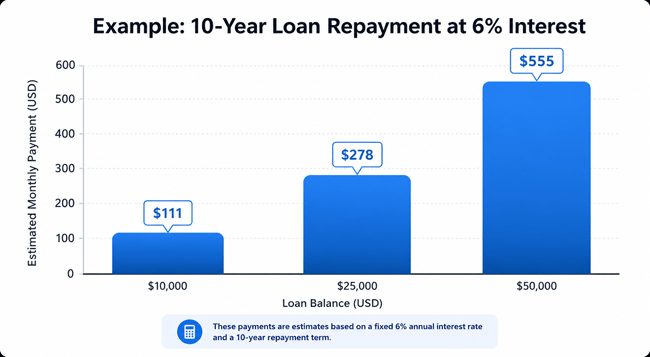
Chart: Estimated monthly payment examples using a 10-year repayment term at 6% interest.
4. Key Inputs You Need Before Using a Student Loan Calculator
| Input | Where to find it | Beginner-friendly explanation |
|---|---|---|
| Loan amount or balance | Financial aid offer, servicer account, lender statement. | The amount borrowed or currently owed. |
| Interest rate | Loan disclosure, StudentAid.gov, loan servicer, private lender offer. | The cost of borrowing expressed as a yearly percentage. |
| Repayment term | Loan agreement or calculator setting. | How long you plan to take to repay the loan. |
| Loan type | StudentAid.gov dashboard, lender portal, promissory note. | Federal and private loans have different protections and calculators. |
| Income and family size | Tax return, pay stub, household information. | Needed for federal income-driven repayment estimates. |
| Extra payment amount | Your monthly budget. | Optional amount paid above the minimum to reduce interest. |
| Fees | Loan disclosure or lender quote. | Origination fees or refinance costs may change the true cost. |
5. How to Use a Student Loan Calculator Step by Step
- Gather your loan details: Collect the loan amount, interest rate, loan type, repayment term, and any fees. If you already have federal loans, log in to your official Federal Student Aid account or your servicer account to confirm balances and rates.
- Choose the right calculator: Use a simple payment calculator for basic fixed-payment estimates. Use the Federal Student Aid Loan Simulator when comparing federal repayment plans, income-driven repayment, consolidation, or possible forgiveness.
- Enter the current balance or planned borrowing amount: Use the actual balance for repayment planning. Use the amount you expect to borrow for college-cost planning.
- Enter the interest rate carefully: Use the annual interest rate, not the monthly rate, unless the tool specifically asks for monthly interest.
- Select the repayment term: Compare at least two terms, such as 10 years and 15 years, so you can see the trade-off between lower monthly payments and higher total interest.
- Review monthly payment and total cost: Do not focus only on the monthly payment. A lower payment can cost more if it stretches repayment over many years.
- Test extra payments: Add a small extra payment, such as $25, $50, or $100 per month, to see how quickly interest savings can grow.
- Compare scenarios before deciding: Save or write down each scenario: standard repayment, lower payment option, extra payment plan, and refinance option if relevant.
- Confirm with your servicer or lender: Calculator results are estimates. Confirm exact payment amounts, eligibility, and terms before changing plans or signing a loan agreement.
6. Federal Student Loan Calculator vs Private Student Loan Calculator
Federal and private student loans should not be evaluated with the same assumptions. Federal loans may qualify for repayment plans, deferment, forbearance, consolidation, and certain forgiveness programs. Private loans usually depend on the lender contract and credit profile.
| Feature | Federal Loan Simulator | Private Loan Calculator |
|---|---|---|
| Best for | Federal repayment plan comparison. | Estimating fixed or variable private loan payments. |
| Uses income? | Often, for income-driven repayment estimates. | Usually no, unless the lender uses income for underwriting. |
| Shows forgiveness? | May estimate forgiveness for eligible federal programs. | Usually no forgiveness estimate. |
| Shows consolidation? | May show Direct Consolidation Loan scenarios. | Private refinance calculators may show refinance scenarios. |
| Risk to watch | Assumptions may not include past qualifying payments or all future changes. | May ignore federal benefits lost through refinancing. |
| Best next step | Compare plans and confirm with StudentAid.gov or your servicer. | Read loan disclosures and compare APR, term, fees, and cosigner rules. |
7. Student Loan Repayment Options a Calculator May Compare
| Repayment option | How payments generally work | Best for | Main caution |
|---|---|---|---|
| Standard repayment | Fixed payment over a set term, commonly 10 years for many federal loans. | Borrowers who can afford the payment and want to reduce long-term interest. | Payment may be higher than income-based options. |
| Graduated repayment | Payments start lower and rise over time. | Borrowers expecting income to increase. | Can cost more over time than standard repayment. |
| Extended repayment | Payments are spread over a longer period. | Borrowers who need a lower monthly payment. | Longer repayment usually means more interest. |
| Income-driven repayment | Payment is based on income and family size for eligible federal loans. | Borrowers whose standard payment is unaffordable. | Total interest may grow if payments are low. |
| Private refinance | A new private loan replaces one or more existing loans. | Borrowers with strong credit seeking a lower rate or different term. | Refinancing federal loans into private loans can permanently remove federal benefits. |
8. Why Student Loan Calculator Results Matter
- They translate a large loan balance into a monthly budget number.
- They reveal how interest affects the total cost of college debt.
- They help you compare repayment plans before changing anything.
- They make it easier to decide whether extra payments are worth it.
- They can help prevent overborrowing by showing future payment pressure before the loan is taken.
9. Benefits of Using a Student Loan Calculator
| Benefit | Practical value |
|---|---|
| Better borrowing decisions | Estimate the future payment before accepting a loan. |
| Clearer repayment planning | See whether your expected income can handle the payment. |
| More confident plan comparisons | Compare standard, graduated, extended, income-driven, and refinance scenarios. |
| Interest savings opportunities | Test the impact of extra payments or shorter terms. |
| Stress reduction | Replace guesswork with realistic estimates and next steps. |
10. Limitations and Risks of Student Loan Calculators
- Calculator results are estimates, not guarantees. Your actual payment can change if your rate, balance, plan, income, family size, fees, or loan status changes.
- Income-driven repayment estimates may change when federal rules, income, tax filing status, or family size change.
- Private variable-rate loans can become more expensive if rates rise.
- Calculators may not fully show the value of federal protections such as deferment, forbearance, income-driven repayment, or forgiveness eligibility.
- Using only the lowest monthly payment can lead to higher total interest over time.
11. Most Searched Questions a Student Loan Calculator Helps Answer
- How much will my student loan payment be?
- How much interest will I pay on my student loans?
- Should I choose a 10-year or longer repayment term?
- What happens if I pay extra each month?
- Can income-driven repayment lower my payment?
- Should I refinance my student loans?
- How much can I afford to borrow for college?
- How long will it take to pay off my student loans?
12. Real-World Student Loan Calculator Examples
12.1 Example 1: A student deciding how much to borrow
A student is offered more loans than needed for tuition after scholarships. They use a calculator to compare borrowing $8,000 versus $12,000. The higher loan gives more short-term cushion, but the calculator shows a higher monthly payment and more interest. The student decides to borrow only what is needed and use a part-time job for books and transportation.
12.2 Example 2: A graduate choosing between lower payment and lower total cost
A recent graduate can afford the standard payment but is tempted by a lower monthly option. A calculator shows the lower payment frees up cash now but increases total interest. They choose standard repayment and keep an emergency fund so they do not have to rely on credit cards.
12.3 Example 3: A borrower considering extra payments
A borrower enters their current balance, interest rate, and term, then tests an extra $75 per month. The calculator shows an earlier payoff and lower interest. They set up automatic extra principal payments, but only after confirming there is no prepayment penalty.
12.4 Example 4: A federal borrower struggling with payments
A borrower cannot afford the standard payment. They use the Federal Student Aid Loan Simulator to compare federal repayment options and see whether income-driven repayment may lower the payment. They then confirm eligibility through StudentAid.gov or their servicer before applying.
13. Pros and Cons of Relying on a Student Loan Calculator
| Pros | Cons |
|---|---|
| Fast way to estimate monthly payments. | Results are only as accurate as the numbers entered. |
| Helps compare repayment plans side by side. | May not capture every federal benefit or future rule change. |
| Shows total interest, not just the minimum payment. | Private loan calculators may emphasize affordability while underplaying risk. |
| Encourages informed borrowing before debt is taken. | Can create false confidence if borrowers ignore fees, variable rates, or income changes. |
14. Common Student Loan Calculator Mistakes to Avoid
- Using the wrong interest rate: Enter the actual annual percentage rate from your loan disclosure or servicer account.
- Ignoring total interest: A lower monthly payment is not always cheaper. Always compare total repayment cost.
- Forgetting fees: Origination fees and lender fees can change the real cost of borrowing.
- Assuming estimates are guaranteed: Confirm exact payments and eligibility with your lender, servicer, or StudentAid.gov.
- Comparing federal and private loans only by rate: Federal loans may offer protections that private loans do not.
- Not testing income changes: If income-driven repayment is relevant, run scenarios for lower income, higher income, marriage, or family-size changes.
- Ignoring extra payments: Even small extra payments can reduce interest if applied correctly to principal.
- Using pre-tax income as a complete budget picture: Your payment must fit after taxes, rent, insurance, transportation, food, and emergency savings.
15. Expert Tips for More Accurate Student Loan Estimates
- Run at least three scenarios: realistic, conservative, and aggressive repayment.
- Compare monthly payment and total interest together. Never use one without the other.
- For federal loans, check official federal tools before relying on a third-party calculator.
- For private loans, compare APR, term, cosigner release rules, variable-rate risk, fees, and hardship options.
- Before refinancing federal loans, list the federal benefits you would lose and decide whether the rate savings justify that trade-off.
- Build your repayment plan around take-home pay, not gross salary.
- Update your calculator inputs whenever your balance, rate, income, family size, or repayment goal changes.
16. Costs and Fees to Include When Calculating Student Loans
A student loan calculator may not automatically include every cost. When comparing loans, look beyond the monthly payment and include any costs that affect the true borrowing price.
| Cost or fee | How it affects the estimate |
|---|---|
| Interest | The main ongoing cost of borrowing. |
| Origination fee | A fee deducted from some loans before disbursement or included in the amount borrowed. |
| Late fee | Can apply if payments are missed or late, depending on the lender and loan terms. |
| Capitalized interest | Unpaid interest may be added to principal in some situations, causing interest to accrue on a larger balance. |
| Refinance costs | Some private lenders charge no origination fees, but terms vary; always read disclosures. |
| Autopay discount | Some servicers or lenders offer an interest-rate reduction for automatic payments; confirm current terms before relying on it. |
17. Quick Action Checklist
- Find your loan balance, interest rate, repayment term, and loan type.
- Use a calculator that matches your goal: borrowing, repayment, extra payments, income-driven repayment, or refinancing.
- Compare at least three scenarios before making a decision.
- Review both monthly payment and total interest.
- Test extra payments and shorter repayment terms if your budget allows.
- For federal loans, compare plans with the official Loan Simulator.
- Confirm all estimates with your servicer or lender before changing plans.
- Keep a copy of your calculator assumptions so you can update them later.
18. Frequently Asked Questions About Student Loan Calculators
18.1 What is a student loan calculator?
A student loan calculator estimates monthly payments, total interest, payoff time, and total repayment cost based on loan amount, rate, term, and repayment assumptions.
18.2 How accurate is a student loan calculator?
It can be useful, but it is not a guarantee. Accuracy depends on correct inputs and whether the calculator includes fees, changing income, changing rates, and repayment-plan rules.
18.3 What information do I need to calculate student loan payments?
You need the loan balance or amount, annual interest rate, repayment term, and loan type. For income-driven federal repayment, you may also need income, family size, tax filing status, and state.
18.4 How do I calculate my student loan payment manually?
For fixed loans, use the amortization formula with principal, monthly interest rate, and number of payments. Most borrowers should use a trusted calculator to avoid formula mistakes.
18.5 Does a lower monthly payment mean a better loan?
Not always. A lower payment can help your budget, but it may increase total interest if it extends the repayment period.
18.6 Can a calculator show loan forgiveness?
Some federal tools can estimate possible forgiveness for eligible repayment plans or programs. Private calculators usually do not show forgiveness because private student loans generally do not have federal forgiveness benefits.
18.7 Should I use a federal or private calculator?
Use a federal calculator for federal repayment plans and a private loan calculator for private loan offers. Use both if you are comparing federal repayment with private refinancing.
18.8 Can I use a calculator before borrowing for college?
Yes. Enter the amount you expect to borrow, the likely interest rate, and repayment term to estimate whether the future payment may be affordable.
18.9 What is total interest paid?
Total interest paid is the estimated amount you pay for borrowing money, separate from repaying the original principal.
18.10 What happens if I pay extra on my student loans?
Extra payments can reduce principal faster, shorten repayment time, and lower total interest if the lender applies the extra amount correctly.
18.11 Can student loan calculators include variable rates?
Some can, but variable-rate estimates are uncertain because future interest rates can change.
18.12 Does refinancing change calculator results?
Yes. Refinancing can change the rate, term, monthly payment, and total interest. Refinancing federal loans into private loans can also remove federal benefits.
18.13 Can my payment be $0 under an income-driven plan?
Some eligible federal borrowers may have very low or $0 payments under income-driven repayment depending on income and family size, but eligibility and rules must be confirmed through official channels.
18.14 Do calculators include late fees?
Most basic calculators do not include late fees. You should review your loan terms and avoid late payments whenever possible.
18.15 How often should I recalculate my student loans?
Recalculate whenever your balance, rate, income, family size, repayment plan, or financial goal changes.
19. Conclusion: Use the Calculator, Then Make the Human Decision
A student loan calculator is one of the most useful tools for turning loan confusion into clear numbers. It can estimate monthly payments, interest cost, payoff dates, and the effect of different repayment strategies. But the best decision is not always the one with the lowest monthly payment or the lowest advertised interest rate.
Use calculator results as a decision guide, not a final answer. Compare scenarios, understand the trade-offs, check federal protections before refinancing, and confirm your exact options with official sources. The goal is not just to repay student loans; it is to choose a repayment path that protects your budget, reduces avoidable interest, and supports your broader financial life.
Sources Consulted
This article uses official student-loan guidance as trust anchors. Readers should verify current loan-specific details with their servicer, lender, or official government resources before making repayment or refinancing decisions.
- Federal Student Aid: Loan Simulator and repayment calculator guidance:
- Federal Student Aid: Federal student loan interest rates:
- Federal Student Aid: Preparing for student loan payments:
- Edfinancial/Federal Student Aid: Repayment plan comparison:
- MOHELA/Federal Student Aid: Loan repayment calculator:
Reader Advice: This article is for general educational and informational purposes only and does not constitute individualized financial, legal, tax, accounting, or investment advice. Loan rates, APRs, fees, eligibility, underwriting standards, credit reporting practices, and applicable laws may vary by lender, loan type, borrower profile, location, and current regulations.
Always review the official loan agreement and disclosures, compare offers based on APR, fees, monthly payments, and total repayment cost, and verify current terms with the lender, loan servicer, StudentAid.gov, the SBA, or other relevant official sources when applicable.
If you need advice for your specific situation, especially involving debt disputes, lawsuits, foreclosure, wage garnishment, bankruptcy, or tax matters, consult a qualified financial professional, nonprofit credit counselor, tax adviser, accountant, consumer attorney, or legal aid organization.